Partnerportal – Subunternehmer & Auftragsannahme
Separate logins for subcontractors and outside clients: assign jobs, document progress with photos and videos, review and accept requests.
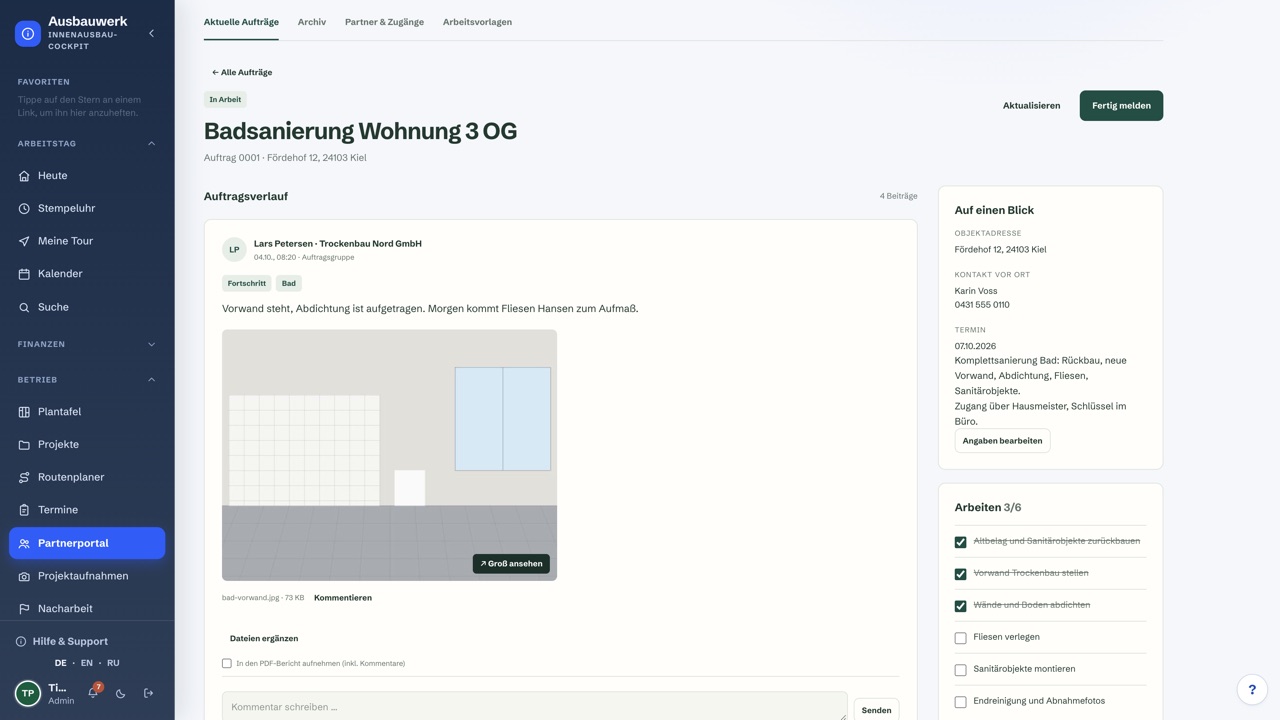
Two areas, one add-on
The partner portal gives people outside your company their own login to your CRM. It covers two things: working with subcontractors and accepting jobs from outside clients.
Subcontractor management
- Separate logins: Each subcontractor gets an account with company details and contact persons. The access email contains a one-time link.
- Jobs as groups: You assign jobs. Each job is a group of tasks.
- Documentation on the job: Posts, comments, photos and videos collect in the task.
- Completion: The subcontractor reports the job done. Your office accepts it or asks for rework. Finished jobs move to the archive.
- PDF reports per job.
- Permissions per role and per person: You decide who sees and does what.
Accepting outside jobs
- Client logins: You create them, or clients register themselves.
- Multi-step request form: with templates, address and photos.
- Office review: Every request reaches you. You review it and accept the job.
- Report release: You decide which reports the client can see.
Photos, videos and storage
- Photos: JPEG, PNG and WebP up to 20 MB and 40 megapixels per file. Export HEIC photos as JPEG first.
- Videos: MP4, MOV and WebM up to 300 MB and 15 minutes per file. The server converts them to H.264 up to 1080p and then deletes the original.
- Storage: 1 GB per job and 10 GB per CRM installation by default. The original, the converted file and reserved space all count.
- Location: Media is stored on the server of your CRM installation.
Price and requirement
€69.00 per month plus 19% VAT. The add-on is not included in any plan, not even Premium. It requires an active CRM license (Basis, Pro or Premium). Book it with a new plan or later on top of your existing license.
All features at a glance
Subcontractors
- Separate login per subcontractor, with company details and contact persons
- Access email with a one-time link
- Assigned jobs as groups of tasks
- Posts, comments, photos and videos
- Completion report, rework, acceptance and archive
- PDF reports
- Permissions per role and per person
Accepting outside jobs
- Client logins, including self-registration
- Multi-step request form with templates, address and photos
- Review and acceptance by your office
- Report release for the client
Media and storage
- Photos: JPEG, PNG, WebP up to 20 MB and 40 megapixels (export HEIC as JPEG first)
- Videos: MP4, MOV, WebM up to 300 MB and 15 minutes per file
- Converted on the server to H.264 up to 1080p, then the original is deleted
- 1 GB per job and 10 GB per CRM installation by default
- Original, converted file and reserved space all count toward storage
Booking
- €69.00 per month plus 19% VAT
- Requires an active CRM license (Basis, Pro or Premium)
- Not included in any plan, not even Premium
- Book it with a plan or later on top of your existing license
—
Frequently asked questions
Do I need a CRM license?
Yes. The partner portal extends an existing CRM and does not run on its own. An active Basis, Pro or Premium license is enough, and it does not have to come from a subscription.
Is the partner portal included in Premium?
No. It is part of no plan and costs €69.00 per month plus 19% VAT on every plan.
How do I add it to an existing license?
Sign in and open the license in your account. There you book the add-on as its own monthly subscription. The CRM installation checks the license every 24 hours and then unlocks the partner portal.
Which photos and videos can I upload?
Photos as JPEG, PNG or WebP up to 20 MB and 40 megapixels. Export HEIC photos as JPEG first. Videos as MP4, MOV or WebM up to 300 MB and 15 minutes per file.
What happens to uploaded videos?
The server of the CRM installation converts each video to H.264 up to 1080p. It then deletes the original.
How much storage is there?
By default 1 GB per job and 10 GB per CRM installation. The original, the converted file and reserved space all count.
How do I cancel?
In your account under the add-ons of the license. The cancellation takes effect at the end of the current billing period, and the partner portal stays active until then.
Related modules

Kundenportal
Eigener Zugang für deine Kunden — Termine, Rechnungen, Dokumente
Agentur-Paket
Projekte, Aufgaben & wiederkehrende Rechnungen für Agenturen

Einsatz-Paket
Einsatzkarte, Nachrichten und Foto-Anfragen für den Außendienst

Mailbox
Gmail-artiger E-Mail-Client im Cockpit — Postfach abrufen, schreiben, Mails zu Kunden, Tickets, Aufträgen & Terminen verknüpfen